By providing you with as much useful information as possible, we hope to keep Dataflex Link simple to use and help you to make the most of it's wide range of functionality. This page is dedicated to giving you the tools to get yourself set up and become a super user.
Below you'll find video guides, a reference guide and a glossary to give you the best possible support in your use of Dataflex Link.
Here are plenty of video guides to help you set up, use and learn about the different functions available to you when you use Dataflex Link.
In this playlist we set up a license key and download Dataflex Link.
Download, install and set upIn this playlist of tutorials we go through creating a database application step by step. Hopefully this can help you with ideas in creating your own applications.
Creating a sample appHow to create a simple database.
Create a databaseThis playlist shows the functionality of each field type added to a database.
Adding each field typeThis playlist shows the dynamism of searching your data with easy to configure search entry forms.
Search enginesThis playlist shows how we can manage access to our databases and searches.
Access ControlIf you want your database items to be shared across the internet, these tutorials will show you how to set up a database to facilitate and promote social media sharing.
Social media sharingYou can set up Dataflex Link to allow users to make contact with owners of individual database entries. This playlist shows how the 3 different methods of contact work. It also shows how spam protection can be set up.
Contacting database item ownersThe options page has settings which apply to all databases and searches. Take a look through these tutorials to find out how.
Options for all databases and searchesLook through this playlist for helpful tutorials on specific topics.
Helpful videosThis playlist makes use of the dataflex_link_form_field_before action to add data to a field automatically.
Action: dataflex_link_form_field_before (a link to the PHP and JavaScript code used in this tutorial is included in the last video of this playlist.)To use a Dataflex Link database or search engine, you must add the [dataflex-link] shortcode to the page you want it to appear in.
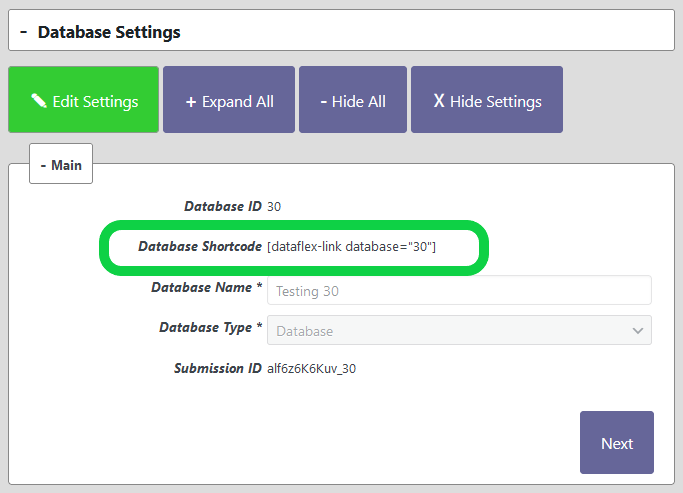
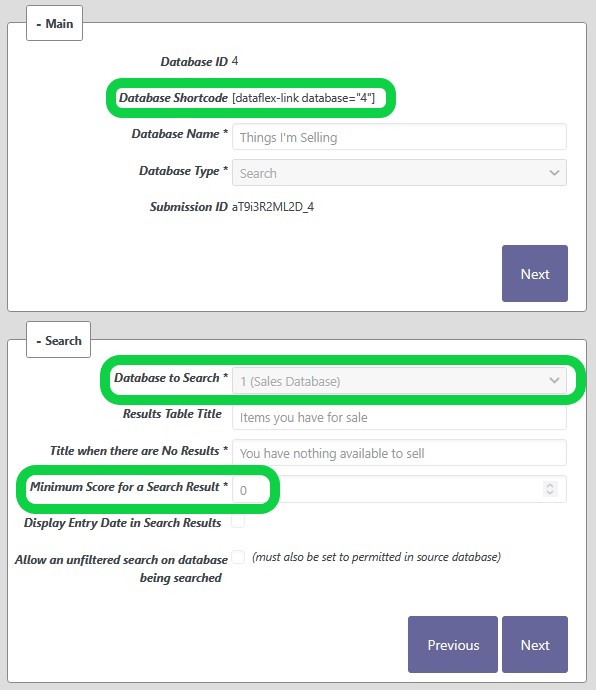
The shortcode for a database or search is available on the settings page of that database or search.
Shortcode settings are simply words added inside a shortcode's brackets to change the behaviour of a database. For Dataflex Link this would look similar to [dataflex-link setting=""]
Set a page to display any single entry only section below.
You have used an invalid link".
To make Dataflex Link fit your website or web app branding, you will need to use Dataflex Link's built-in HTML markup and apply CSS rules appropriate to your branding. The sections below show the markup available to you.
Important Note: Dataflex Link is owned by Web Dewd, and all markup uses .web-dewd-forms prefixes.
These are the forms a user can fill in, either to input data or search a database.
These settings apply to all data entry forms and their fields.
.web-dewd-forms-form-heading.panel-heading .panel-title
Targets the heading of the form.
.web-dewd-forms.panel-body
Targets the container of the form. Every other element of the form will be a child of this CSS path.
.web-dewd-forms.panel-body form
Targets the the form itself, including all labels, fields and buttons.
.web-dewd-forms.panel-body form .control-label
Targets all field labels.
.web-dewd-forms.panel-body .form-control
Targets all data entry fields except checkboxes.
.web-dewd-forms.panel-body .web-dewd-forms-checkbox
Targets all checkboxes.
.web-dewd-file-upload-button.btn.btn-success
Targets image upload buttons.
web-dewd-recaptcha-element .grecaptcha_container
Targets the element which houses the recaptcha robot box.
Note: For buttons which are disabled, you may wish to change the opacity property to 1.
.web-dewd-forms.panel-body .form-group.web-dewd-forms-submit-actions .btn-web-dewd-submit
Targets the submit button.
.web-dewd-forms.panel-body .form-group.web-dewd-forms-submit-actions .btn-web-dewd-reset
Targets the reset button.
.web-dewd-forms.panel-body .form-group.web-dewd-forms-submit-actions .btn-web-dewd-results
Targets the display results button.
.web-dewd-forms.panel-body .form-group .btn-web-dewd-forms-connect
Targets the create padlock button.
These settings apply to forms you have created. Each form and each input for a form has its own id. In these examples, we're going to use the following example id's:
Remember, if you wish to target more than one form or field specifically you can separate CSS paths with commas. However, it is not recommended to target all forms or fields collectively this way. Instead use one of the general settings.
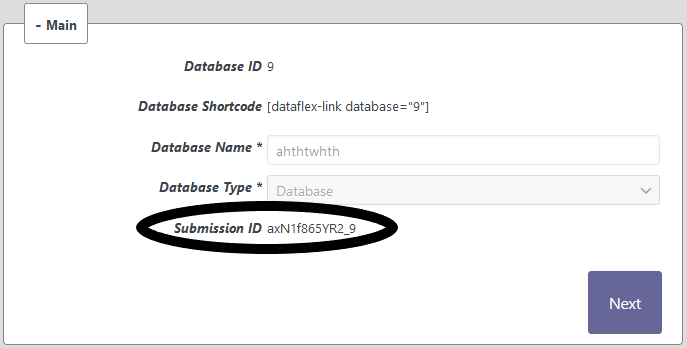
To find a form's id, go to the form's settings from your WordPress Dashboard. A form's id is highlighted in this image.
#a1B2c3456D_1_container.web-dewd-forms
Targets the forms container. Every element of this form is a child of this CSS path.
#a1B2c3456D_1_container.web-dewd-forms form#a1B2c3456D_1
Targets the form itself.
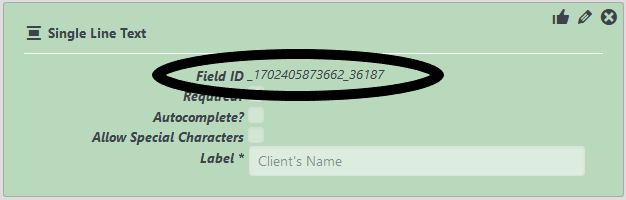
To find a field's id, go to the form's settings from your WordPress Dashboard. A field's id as highlighted in this example image.
.web-dewd-forms.panel-body form [for=_123456789_12345].control-label
Targets the label of this field only.
#_123456789_12345.form-control
Targets the input of this field only.
Taking note of the Field Id you want to target as per the image above use the following markup.
.web-dewd-forms.panel-body form .web-dewd-forms-readonly-container [for=_123456789_12345].control-label
Targets the label of this specific read-only field.
.web-dewd-forms.panel-body form .web-dewd-forms-readonly-container #_123456789_12345_container.form-control.web-dewd-forms-readonly
Targets the input of this specific read-only field.
.web-dewd-forms.panel-body form .web-dewd-forms-readonly-container.web-dewd-forms-readonly-no-content
Targets empty fields. This will target both the label and the field. You can make the CSS more specific to label or field as per the 2 sections above. Just change .web-dewd-forms-readonly-container to .web-dewd-forms-readonly-container.web-dewd-forms-readonly-no-content.
Dataflex Link uses 4 types of modal. Confirmation, action, alert and search results. Each modal has its own markup.
An action modal requires a decision and maybe input from the user.
.web-dewd-forms-action.modal .modal-dialog .modal-content
Targets the action modal itself. Every other element of the action modal will be a child of this CSS path.
.web-dewd-forms-action-title
Targets the title of the action modal.
.web-dewd-forms-action-text
Targets the text of the action modal.
#web_dewd_forms_action_input
Targets any standard input of an action modal
#web_dewd_forms_action_email
Targets the email input of an action modal
web-dewd-recaptcha-element .grecaptcha_container
Targets the element which houses the recaptcha robot box.
.btn.btn-web-dewd-action-confirm.btn-warning
Targets the confirmation button of an action modal
.btn.btn-web-dewd-action-cancel.btn-info
Targets the cancel button of an action modal
An alert modal warns the user of something and provides a confirmation button.
.web-dewd-forms-alert .modal-dialog .modal-content
Targets the alert modal itself. Every other element of the alert modal will be a child of this CSS path.
.web-dewd-forms-alert-title
Targets the title of the alert modal.
.web-dewd-forms-alert-text
Targets the text of the alert modal.
.btn.btn-web-dewd-alert-confirm.btn-primary
Targets the confirm button of an alert modal
A confirmation modal advises the user of a successful entry submission to the server.
.web-dewd-forms-confirmation .modal-dialog .modal-content
Targets the confirmation modal itself. Every other element of the confirmation modal will be a child of this CSS path.
.web-dewd-forms-confirmation-content
Targets the content of the modal. The content is defined in the database/ search's database settings in the Entry Confirmation section.
.web-dewd-share-link
If a form is set up to be able to share entries added, this path will target the sharing icons.
.btn.btn-web-dewd-confirmation-confirm.btn-primary
Targets the confirm button of a confirmation modal
A search results modal displays a confirmation message and any results which match the search.
.web-dewd-forms-search-results .modal-dialog .modal-content
Targets the search results modal itself. Every other element of the search results modal will be a child of this CSS path.
.web-dewd-results-confirmation-content
Targets the confirmation section of the modal. The content is defined in the database/ search's database settings in the Entry Confirmation section.
.web-dewd-results-paragraph
Targets the search results title. The content is defined in the database/ search's database settings in the Search section.
.btn.btn-web-dewd.btn-primary
Targets the close button of a search results modal
.web-dewd-results-table.table
Targets the list of search results.
.web-dewd-results-table thead tr th
Targets the search results heading row cells.
.web-dewd-results-table.table tbody tr td
Targets each cell of every row of search results.
[data-web-dewd-results-table].web-dewd-results-table .web-dewd-table-detail
Targets the open button at the beginning of each row.
.web-dewd-forms-search-result-image-modal .modal-dialog
Targets an image's preview window opened directly from a results list.
.web-dewd-results-table-container .web-dewd-results-detail-table-container
Targets the box containing the data for the individual search entry.
.web-dewd-results-detail-table-container .web-dewd-results-detail-table thead
Targets the heading of the individual search entry.
.web-dewd-results-table-container .web-dewd-results-detail-table-container .web-dewd-results-detail-table td:first-child
Targets the field name for the individual search entry.
.web-dewd-results-table-container .web-dewd-results-detail-table-container .web-dewd-results-detail-table td:nth-child(2)
Targets the data for the individual search entry.
These CSS paths are for the controls dropdown which appears at the top of all forms where a user is connected or Entry Actions are available eg. Editing or Archiving.
.web-dewd-forms-client-controls-panel #web-dewd-forms-client-controls-panel-display
This targets the controller's display/ hide toggler.
.web-dewd-forms-client-controls-panel .web-dewd-forms-manage-entry-actions-holder
This targets the controller's fields container.
.web-dewd-forms-manage-entry-actions-holder .web-dewd-forms-session-manager-container
This targets the session manager controls container. Contains the obfuscated email of the user connected.
These CSS paths are for miscellaneous elements not covered the above categories.
button.btn.btn-web-dewd
All buttons used by Dataflex Link have this CSS path. Unless you override this path, this should target all buttons.
.web-dewd-forms-get-my-items.btn.btn-success
This targets a Get My Items
button where the search-my-items-button="true" shortcode setting has been used.
WordPress actions and filters should be used by advanced WordPress users who have knowledge about PHP and creating functions.
For anyone who wishes to learn more about how actions and filters work there are many tutorials on YouTube and other platforms to guide you.
'dataflex_link_form_field_before'
Usage: add_action('dataflex_link_form_field_before','callback_function');There are 3 Parameters sent to callback function: